Bringing Google Inbox's bundles back to Gmail
TL;DR; A weekend project turned actively maintained fork of Inboxy; for people (and AI agents) who still miss Inbox.
When Google Inbox was sunset in 2019, we lost the smartest thing about it: bundles; related email grouped together so your inbox felt organized by intent instead of chaos.
I never stopped missing them. My inbox is where newsletters, receipts, CI noise, and real work collide, and these days I triage it together with my AI agents, and agents, like humans, work better on a structured inbox than on a firehose. Bundles based on my existing and sophisticated set of labels & rules are that structure.
Inboxy, a brilliant open-source extension by Teresa Ou, brought bundles back to Gmail, but it moved into maintenance mode and stopped evolving. Rather than watch it drift out of date, I picked up the torch. On weekends, over the past months, I forked it, kept it working with Gmail's current UI, added the features I personally needed, and kept polishing until it felt right to ship it properly under a new name:

It's live today on the Chrome Web Store and Firefox Add-ons, free and GPL-3.0.
What Inbundly does
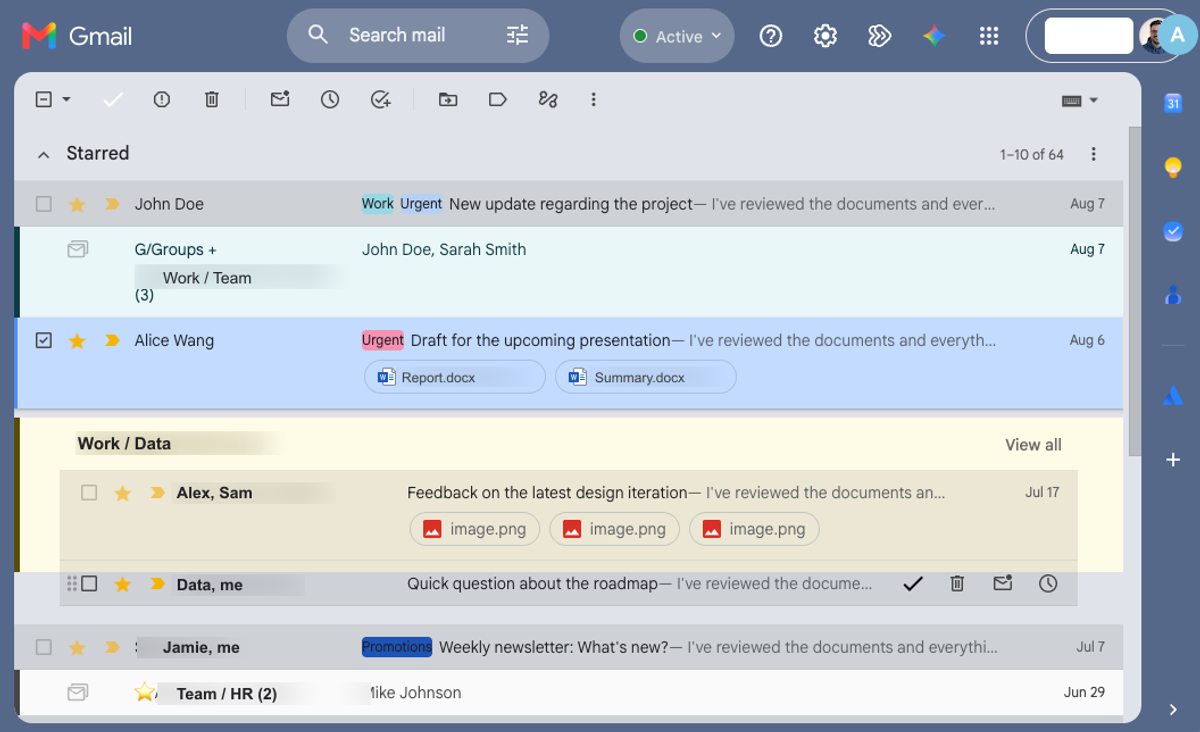
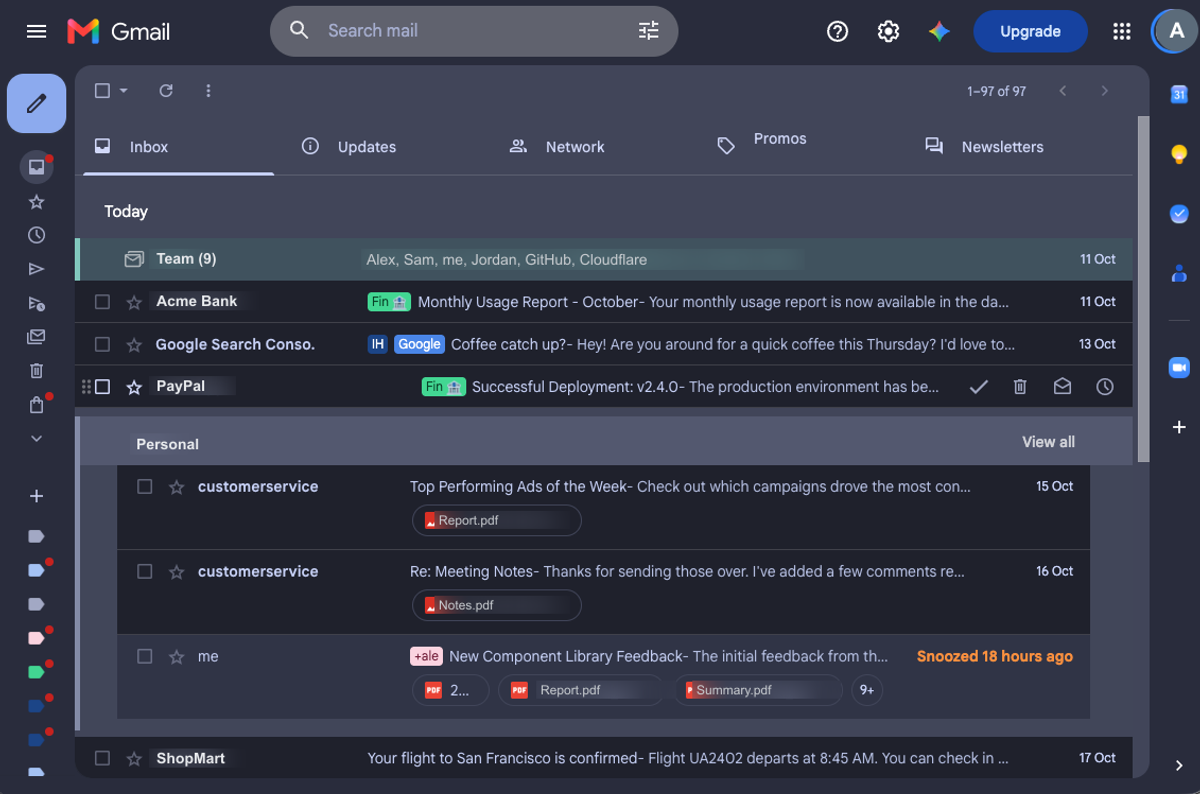
Emails sharing a Gmail label are automatically grouped into tidy, collapsible bundles that are easier to scan and triage. Use Gmail filters to label things once, and Inbundly keeps them bundled forever. Star a message to pin it outside its bundle; archive a whole bundle in one click.
On top of the original, the v4.x line adds what my own triage workflow demanded:
- Custom bundles: Select any messages and bundle them on the fly, no label needed; they sync across your signed-in browsers.
- Priority bundles: Force chosen labels (or label sets) to always group together, with subtree wildcards and first-match-wins rules.
- Label colors: Bundles tinted to match their Gmail label color, theme-aware.
- Bundling across every inbox type: Priority Inbox, Multiple Inboxes, Important-first; each section bundles independently.
- A refreshed, Catppuccin-based palette for light and dark, and a reorganized options page with sync & JSON backup.
Under the hood it stays what Inboxy always was: a lightweight visual layer. JavaScript and CSS drawing bundles on top of Gmail's own UI; no servers, no accounts, no tracking, and your email never leaves your browser. The privacy policy is one page because there's nothing to disclose.
The rebrand, done respectfully
Renaming a GPL project has rules, and I tried to honor both the letter and the spirit:
the fork stays GPL-3.0, Teresa Ou's copyright and attribution are preserved across
headers, NOTICE, and docs, and the customBundles storage key was kept intact so no
existing user loses data. New identity, theme-flipping icon set, new logo, new palette,
same lineage, clearly credited.
Roadmap
- Keep pace with Gmail UI changes (the eternal treadmill of DOM-surgery extensions).
- Explore smarter bundling modes: Category-based bundles, priority grouping, power-user keyboard shortcuts and better hooks for agent-assisted triage.
- Stay true to Inboxy's origins: transparent open-source development, strong privacy, and a calm inbox aesthetic.
Try it, break it, tell me
If you live in Gmail and your inbox feels like a firehose: inbundly.com Chrome + Firefox.
Star the repo, file issues shaped like your real workflow, send PRs. And if it tidies your inbox, a sponsorship keeps the weekends coming. ♥